




Website performance refers to how fast and efficiently a website loads and responds to user interactions, directly impacting user experience and conversions.
Website performance and speed optimization are critical factors for improving SEO rankings, user experience, and conversions. A slow website not only frustrates users but also reduces search visibility and directly impacts your business growth.
Research shows that for each second it takes for a website to load, conversion rates decrease by 7%. In addition, more than 50% of visitors will abandon a site if it takes longer than three seconds to load. As a result, if your site loads slowly, you will be losing customers and dollars every second your page is loading.
This guide will provide ideas on how to improve your website performance, allowing you to provide a faster experience for your customers and grow your overall digital presence and customer conversion rate.
What is Website Performance Optimization?
Website performance optimization is the process of improving a website’s loading speed, responsiveness, and overall user experience to enhance SEO rankings and increase conversions.
The Importance of Website Speed on Conversion
Website speed is very important for:
User Experience –
Users expect a website to be fully loaded within 2 seconds. If it does not load fast enough, they become frustrated and leave.
SEO Rankings –
Google uses both page-speed and Core Web Vitals as a ranking factor. If your website loads quickly compared to other websites, it will rank higher on Google.
Conversion Rate Optimization –
A website that loads quickly has been able to achieve as much as 40% more conversions than a website with a poor-loading time.
Brand Confidence –
If a website loads quickly, it shows that the business has invested in its website and is therefore trustworthy.
Things That Slow Down Your Website and Need to Be Optimized
Before you can optimize your website speed, you first must understand what is slowing it down:
- Large Image Files
- Not Optimizing your Code (CSS, JS, or HTML)
- Having Too Many Plugins
- Using Poor Hosting
- Not Having a Cache
- Not Using a CDN (Content Delivery Network)
How to Enhance Your Website’s Speed and Performance
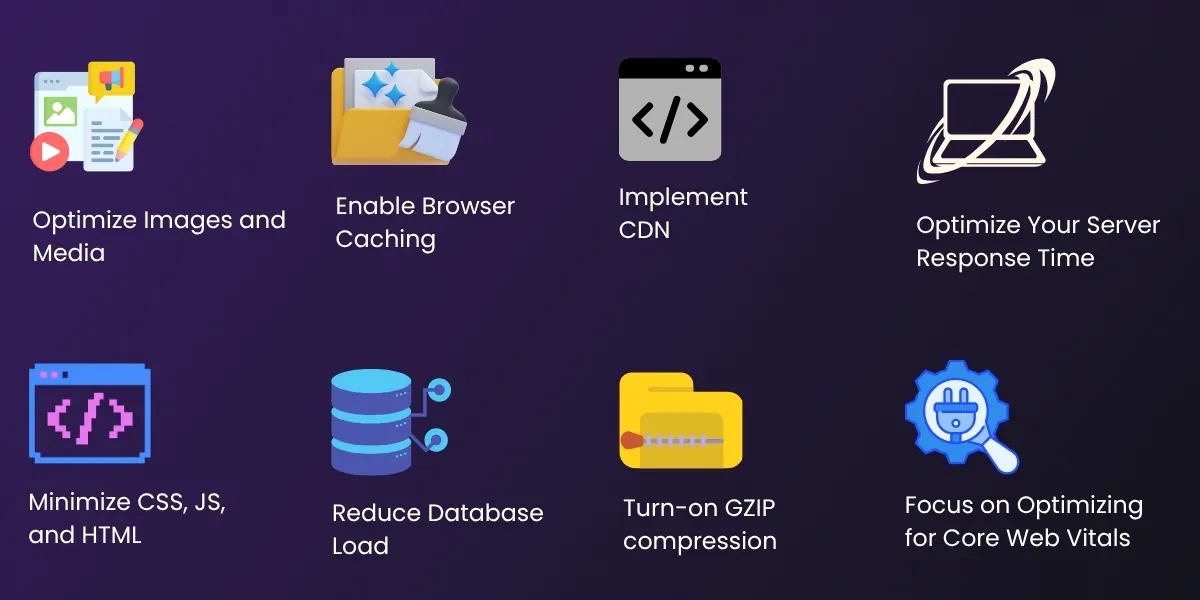
1. Optimize Images for Speed
Images can account for 50-70% of the total weight of a website, making them a key contributor to speed.
You should:
- Compress images without compromising quality
- Use more modern image formats (like WebP)
- Add lazy loading to your images.
These actions can greatly reduce how slow your website’s pages appear to load.
2. Enable Browser Caching
Caching is storing your site’s data in the user’s browser, allowing previous visitors to load your website faster upon their return visits.
The benefits of using caching include:
- Quicker reload of your pages
- Less load on the server
- Improved user experience from faster website navigation.
3. Implement a CDN (Content Delivery Network)
CDNs are a way to store your data on different web servers around the world, essentially spreading your content across multiple servers worldwide.
Benefits of using CDNs:
- Increased speed for users from around the world
- Reduced latency for users globally
- Increased website performance during higher traffic levels.
4. Reduce the Number of HTTP Requests
Every element on your web page (images, scripts, and stylesheets) generates an http request.
Things to consider when optimizing requests:
- Combine CSS and JS files whenever possible
- Delete plugins or scripts that you do not need
- Inline style sheets and/or CSS declarations for small items.
5. Optimize Your Server Response Time
The speed of your website will be greatly impacted by the type of hosting that you have.
Things to look for when choosing your hosting provider include:
- The speed of your hosting provider
- If you have VPS or cloud websites
- If your website’s database queries are optimized.
6. Minify Your CSS, JavaScript, and HTML
Minification reduces the amount of unused code from your websites by removing additional spaces, and comments.
Minification provides benefits for websites when it reduces the size of the files, which therefore contributes to faster loading speeds for each page and is helpful for Search Engine Optimization (SEO).
7. Focus on Optimizing for Core Web Vitals
Google defines Core Web Vitals as:
- Largest Contentful Paint (LCP)
- Interaction to Next Paint (INP)
8. Enable Lazy Loading
Lazy loading delays loading of images/videos until needed.
Benefits:
- Faster initial load
- Reduced bandwidth usage
- Better mobile performance
9. Optimize Mobile Performance
Mobile users account for over 60% of web traffic, making mobile optimization critical .
Tips:
- Use responsive design
- Optimize images for mobile
- Reduce pop-ups
10. Reduce Redirects
- Too many redirects increase load time.
- Keep redirects minimal for better performance.
11. Use Lightweight Themes & Clean Code
Heavy themes slow down websites.
Solution:
- Use custom or optimized themes
- Remove unused code
12. Perform Regular Performance Testing
Use tools like:
- Google PageSpeed Insights
- GTmetrix
- Lighthouse
Regular audits help maintain optimal performance.
Comparison Table
| Factor | Slow Website | Fast Website |
|---|---|---|
| Load Time | 5s+ | <2s |
| Bounce Rate | High | Low |
| Conversions | Low | High |
Core Web Vitals Optimization
Google’s Core Web Vitals are critical for ranking:
Largest Contentful Paint (LCP)
Measures loading performance
Ideal: Under 2.5 seconds
Interaction to Next Paint (INP)
Measures responsiveness
Ideal: Under 200 ms
Cumulative Layout Shift (CLS)
Measures visual stability
Ideal: Less than 0.1
How to Improve:
- Optimize images and fonts
- Reduce JavaScript execution
- Use proper layout dimensions
Website Speed & Conversion Rate Connection
Website speed has a direct impact on conversions:
- Faster checkout = more sales
- Better UX = higher engagement
- Reduced load time = lower bounce rate
Real Data:
1-second delay = 7% drop in conversions
3-second load = 53% abandonment rate
That’s why website optimization for conversions is critical.
Advanced Website Speed Optimization Techniques
In order to achieve higher performance:
• Use GZIP Compression
Compresses files that are sent over the Internet to browsers.
• Use AMP (Accelerated Mobile Pages)
Decreases time to load webpages on mobile devices.
• Server-Side Rendering (SSR)
Enables quick loading times for Dynamic websites.
• Database Optimization
Regularly clean up any data that isn’t currently necessary to the Database and thereby improve performance.
Conversion-Focused Optimization
Speed alone is not enough to increase conversions, combine with Conversion Rate Optimization (CRO):
- Crisp, Clear CTAs
- Form simplification
- Inclusion of Trust Signals (Reviews/Testimonial)
- Landing page optimization
A fully optimized funnel generates significant conversion improvement.
Boost Your Website Speed & Conversions Today!
Struggling with slow website performance? Let Empirical Edge optimize your website for lightning-fast speed, better SEO rankings, and higher conversions.
Frequently Asked Questions
Website performance optimization is the process of improving website speed, responsiveness, and user experience to enhance SEO and conversions.
Website speed is a ranking factor in Google. Faster websites rank higher and provide better user experience.
A good website load time is under 2 seconds. Anything above 3 seconds increases bounce rate significantly.
Faster websites improve user experience, reduce bounce rates, and increase conversion rates.
Written by: Empirical Edge