



Operating an online store requires more than selling merchandise—keeping customers’ data, payment information, and personal information is vital to building trust and success over time. As cyberattacks become more advanced and the Insecurity increases, securing your X-Cart experience can no longer be optional. From malware attacks to DDoS, phishing requests and SQL injections, modern cyber threat conditions can shut you down and tarnish your reputation.
In this manual, we reveal the best and most effective methods to secure your X-Cart store, such as pdf altering configurations, co-hosting configuration, security modules and merchant recommendations.
1. Ensure X-Cart and All Extensions are Up to Date
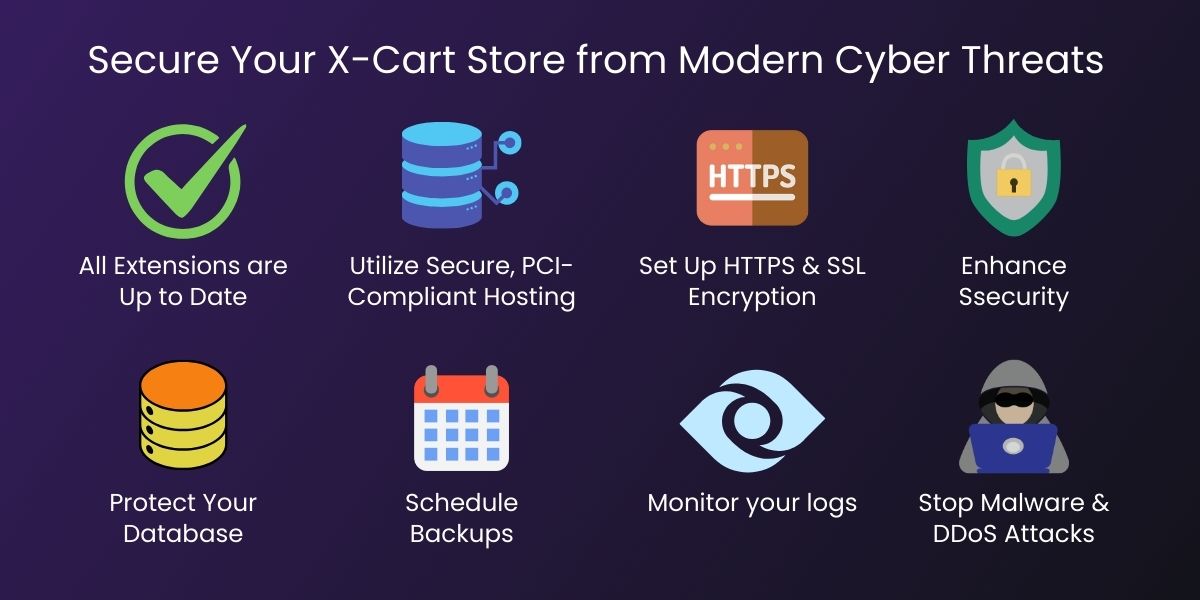
Keeping applications up to date is the cornerstone to eCommerce stores working from a securely sound basis. X-Cart regularly rolls updates and fixes bugs when vulnerabilities are discovered, upgrade security protocols and improve structure.
What to do:
- Run the latest stable version of X-Cart at all times.
- Frequently upgrade all third-party modules and integrations.
- Remove all unneeded plugins and obsolete plugins.
Why it matters:
Hackers look to exploit outdated and vulnerable systems; in knowing where the problems lie specifically. One plugin unpatched can put your entire store in jeopardy.
2. Utilize Secure, PCI-Compliant Hosting
The hosting environment is a key factor regarding the security of your X-Cart store. Shared or sub-par hosting can leave you vulnerable to server breaches and malware injections.
Here are best practices for hosting:
- Choose a hosting provider that is PCI-DSS compliant.
- Choose dedicated hosting or VPS hosting instead of shared hosting.
- Add server-side firewalls like ModSecurity.
- Ensure real-time malware scanning is enabled on the server.
Benefits of a secure hosting environment include resisting server-side attacks and adding protection before a threat reaches your site.
3. Set Up HTTPS & SSL Encryption
HTTPS with an SSL certificate will encrypt data transfer between your server and your customers. This is also a safeguard against man-in-the-middle attacks, theft of data (or payment fraud), as well.
Securing steps include:
- An SSL certificate (Let’s Encrypt, DigiCert, etc.).
- Redirecting HTTP traffic to HTTPS.
- Verifying that all images, scripts and external files load over HTTPS to avoid mixed-content warnings.
Impact of an encrypted checkout page includes both safety and possibly a boost in Google rankings along with building confidence with customers.
4. Enhance Administrator Access and Authentication
Weak passwords and unsecured admin panels are among the top causes of eCommerce breaches.
Tips:
- Use strong passwords (12+ characters with symbols).
- Enable two-factor authentication (2FA).
- Restrict IP access to your admin panel.
- Change the default admin URL to a unique custom URL Path.
- Limit a user’s login attempts to prevent brute-force.
Result:
By restricting your access points you enormously reduce the odds of unauthorized access to your back office.
5. Use X-Cart Security Modules
There are several modules X-Cart offers that improve security of your store. These tools help you detect suspicious activity, block attackers and implement more secure policies.
Examples of security modules include:
- Fraud detection tools
- Real-time activity logs
- IP blocking & firewall extensions
- Malware scanners
- Login attempt limiters
- CAPTCHA
Reason:
They add layers of automated protection that intercept threats before they can become a disaster.
6. Protect Your Database
A hacked database can expose customers’ personal information, passwords, orders, and payment information. Database security is critical for compliance and trust.
How to protect your X-Cart database:
- Use a strong and unique password for the database.
- Restrict access to the database only to the application server.
- Turn remote access off when it’s not necessary.
- Perform database backups on a regular basis.
- Set database user access with least-privilege.
Bonus step:
Enable SQL injection filters on both the server and application level.
7. Schedule Backups
Backups can save you. Even with the best security systems, there is no system that is 100% breach-proof.
Backing up needs to be:
- Scheduled to run automatically on a daily basis.
- Backups stored securely and in multiples.
- The files must be encrypted.
- Test reconstruction of the files to determine their usability.
Why it’s important:
A backup allows you to quickly recover from a cyber attack, server failure, or mistakenly deleted data.
8. Monitor your logs and user activity
Monitoring allows you to track unusual activity during the initial stages of an attack before it turns into something more serious.
You can monitor:
- Admin logins and failed Admin logins.
- File activity on the server.
- Suspicious IP addresses.
- Payment issues.
- SQL errors and invalid queries.
Consider using real-time monitoring tools to receive alerts during suspicious activity.
9. Safeguard Against Malware and DDoS Attacks
DDoS attacks flood your site with a high volume of fake traffic, while malware is more insidious, injecting damaging code into your online store. Both can be incredibly disruptive to your operations while damaging your customers’ trust.
Here’s how to safeguard against attacks:
- Implement CDN protection (like Cloudflare, Fastly, etc.)
- Utilize server-level antivirus software.
- Block suspicious IP ranges.
- Facilitate CAPTCHA on login and checkout forms.
- Regularly scan files for malicious code.
A Web Application Firewall (WAF) can block harmful requests before reaching your store.
10. Train Your Staff on Security Awareness
Human error is still a large contributing factor in an organization’s vulnerabilities to cyber threats.
Here’s what your team should know:
- How to identify phishing emails.
- Never click suspicious links.
- Use secure passwords.
- Do not share credentials.
- Understand and implement secure internal policies.
Even the most secure online store can be compromised if staff fall for social engineering tactics.
Your Final Thoughts
Securing your X-Cart store is a combination of best practices, making sure you keep practicing, and proactively protecting against abuse. The threats change often, especially as criminals become more sophisticated. Merchants and service providers have to stay ahead of the criminals by using modern tools, configuring them securely, and making security a habit and philosophy.
By implementing the ideas above – keep your store updated, use 2-factor authentication, use secure hosting, have HTTPS, keep your database secure, defend against malware, and much more, you’re making a trustworthy shield to protect your customers and strengthen your business.
Secure Your X-Cart Store With Expert Ecommerce Protection
Keep your X-Cart store safe from modern cyber threats — partner with Empirical Edge for advanced security solutions, compliance support, and continuous protection tailored to your ecommerce needs.
Frequently Asked Questions
Ecommerce stores handle sensitive customer data and financial transactions — strong security protects against data breaches, fraud, and reputational damage.
Threats include SQL injection, cross-site scripting (XSS), malware, brute force attacks, and unsecured APIs that can compromise store data.
Yes — implementing HTTPS encryption with SSL/TLS ensures secure data transmission between users and your server.
Yes — regular backups ensure you can restore data quickly after an attack or data loss incident, minimizing downtime.
Continuous logging and real-time monitoring alert you to suspicious behavior so you can respond quickly to potential threats.
Written by: Empirical Edge Team