


Building an SEO-friendly website using a CMS (Content Management System) is essential for ranking higher on Google and driving organic traffic. Whether you’re using platforms like WordPress, Drupal, or Shopify, the right SEO strategies can significantly improve your visibility.
In this guide, you’ll learn how to build an SEO-friendly website using a CMS, including technical setup, optimization strategies, and advanced techniques used by experts.
What is an SEO-Friendly CMS Website?
An SEO-friendly CMS website is designed to:
- Load fast
- Be mobile-responsive
- Have clean URLs
- Be easily crawlable by search engines
In simple terms:
It helps Google understand and rank your website better.
1. Developing a Supportive CMS with SEO Built-in
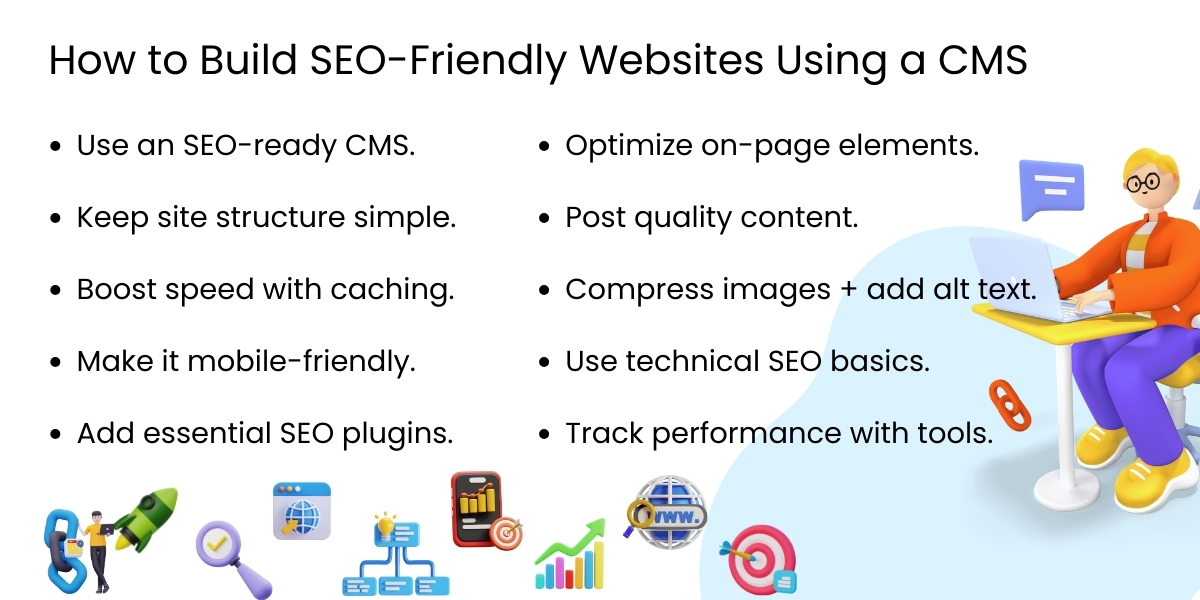
Each CMS has different levels of SEO support, so look for the following when choosing a CMS:
- Customizable URLs (SEO-friendly permalinks)
- Ability to add Meta tags (title, description)
- Mobile-responsive themes/templates
- Built-in support for schema markup
- Options for image alt tags
- Easy editing/organizing of content
- Plug-in ecosystem for enhanced SEO capabilities.
CMSs such as WordPress, Drupal, and headless ones like Strapi and Contentful are all well-known for having strong SEO capabilities.
2. Implementing a Search Engine-Friendly Website Structure
SEO-friendly websites are heavily organized and are therefore efficient for search engines to crawl.
A CMS should let users:
- Create hierarchical menus
- Categorize/tag content
- Create logical URL structures
- Organize pages into distinct sections.
Having a well-organized sitemap increases user experience as well as crawlability. Ensure that if your CMS has an automatic sitemap generator, it also submits that sitemap to the search engines.
3. Optimize Your CMS-Based Website’s Performance/Speed
The performance/speed of a website is a ranking criterion. Sites with slow loading times will lose traffic, conversions, and Rankings as a result.
Some examples of how to improve performance include:
- Using lightweight WordPress themes/templates.
- Compressing images and enabling browser caching.
- Using a CDN (Content Delivery Network) to host your site and minimize the amount of plugins that could potentially degrade the performance of your site.
4. Optimize Your Site for Mobile or Use a Mobile-Friendly Platform
CMS vendors typically provide a responsive template with their product offerings today, but there are factors like custom-designed templates or bulky plugins that can adversely affect your website’s mobile performance. Implement the following best practices for Mobile SEO:
- Utilize Templates that are Responsive
- Text should be legible without the need for zooming on mobile devices.
- Avoid using disruptive pop-ups on mobile devices.
- Optimize Images and Layouts that fit Mobile Devices.
- Run Mobile Speed Tests Frequently.
Since Google is using Mobile-First Indexing, your CMS website must provide an optimal experience for visitors on a mobile phone.
5. Use SEO Plugin/Modules
By using plugins, you’re able to automate your most important SEO functions and make it easier to implement on your site. Depending on your CMS, you will want to implement:
- SEO plugins such as Yoast SEO, RankMath, SEOPress.
- Performance plugins such as WP Super Cache, LiteSpeed Cache.
- Image Optimization Plugins like Smush or TinyPNG.
- Schema Markup Plugins like Schema Pro or Yoast Schema.
- Security Plugins like Wordfence or Sucuri.
The above tools will assist your CMS with properly handling metadata, Sitemap(s), Robots.txt Rules, and Mobile SEO.
6. On-page SEO Optimize Each Page
CMS platforms allow users to do an enormous amount of work with on-page SEO through editable fields. Be sure to focus on:Title Tags – Keywords must be included in your title tag and be 60 characters or less in length.
- Meta Descriptions – Descriptive/meta data should be focused on keywords, generally under 160 characters.
- Header Tags (H1, H2, H3) – Use keywords in the Header Tag.
- SEO-friendly URLs – Short and descriptive URLs should be used.
- Keyword Optimized Content – Keywords should be included in the text naturally as well as used in Header Tag content.
- Internal Linking – Link to other pages that are related to one another.
- External Links – Link to trustworthy, authoritative sources.
7. Focus on Quality Content
Quality content is essential for improving your sites SEO, while every CMS makes it easy to publish content. To increase your chances of being found by search engines:
- Create informative and valuable pages
- Identify Keyword Intent via Keyword Research
- Publish on a regular schedule
- Revise old content by adding new information
- Include text, images, video and infographics
- Avoid Keyword Stuffing, Google Search Engines favor content that is useful, engaging, and well organized.
8. Optimize Each Image on Your Site for Search Engines
While a CMS is very easy to manage images, it’s important to Optimize Each Image for SEO.
- Write descriptive Alt Text
- Compress Images
- Use New Age Formats for Images like WebP & AVIF
- Write Descriptive File Names for your Images
- Utilizing Image Optimization Plugins
- Optimized Images improve Load Speed and Accessibility.
9. Technical Search Engine Optimization through Your CMS
Technical Search Engine Optimization helps Search Engine Algorithms understand what your site is and helps them Access Your Site. Using Your CMS you can Setup Technical SEO:
- Set Up XML Site Maps
- Set Up Robots.txt
- Enable HTTPS
- Enable Canonical Tags to Prevent from Being a Duplicative Piece of Content
- Implement Schema
- Fixed Broken Links
- Enable a Breadcrumbs Navigation
Technical SEO is fundamental to the visibility of Your Website.
10. Track and Analyze Your Website’s Performance
No SEO plan will be effective without testing and tracking performance in an analytical capacity and through useful tools like:
- The Analytics Tool From Google
- The Webmaster Tools From Bing
- The Google Search Console
The tools mentioned above allow you to track metrics such as page performance speed, keyword ranking, click-through rates, crawl errors, and how users navigate through your site. Using a content management system in combination with the tools for analyzing your website’s performance allows marketers to continually improve their SEO plans.
Conclusion
Using a CMS to create an SEO-friendly site will be easier with the appropriate CMS plugins, SEO tools, and an understanding of how to optimize your site. By concentrating on structure, speed, content quality, and technical SEO, you will be able to improve your website’s visibility in the search engine result pages and provide an excellent user experience.
While a CMS offers the ability to create content easily, continuous optimization through the use of appropriate tools and the generation of high-quality content will lead to a successful SEO strategy. Ultimately, a CMS-based website will help generate organic traffic, increase search rankings, and support long-term growth in the digital space.
Ready to Build an SEO-Friendly Website That Ranks on Google?
Struggling to improve your website’s visibility and performance? Our experts can help you create a fast, optimized, and high-ranking CMS website tailored to your business goals.
Frequently Asked Questions
A CMS improves rankings by enabling fast page creation, optimized metadata, schema markup, internal linking, mobile responsiveness, site speed optimization, and regular content updates—all critical Google ranking factors.
Site speed is critical. CMS websites must be optimized with caching, lightweight themes, optimized images, CDN integration, and clean code to reduce bounce rates and improve rankings.
Absolutely. CMS platforms are built for blogging, landing pages, keyword targeting, internal linking, and content updates—making them ideal for long-term SEO growth.
Empirical Edge designs and develops SEO-first CMS websites with optimized architecture, fast performance, mobile usability, schema integration, and content-ready structures to maximize organic growth and lead generation.
Written by: Empirical Edge Team