


SQL Server is an excellent database engine for running on Azure, due to its unmatched scalability and availability, as well as its enterprise-grade security. However, if your organization has not implemented a proper plan for using SQL Server on Azure, it is easy for your monthly costs to go up rapidly due to your choices regarding compute, storage, licensing, and networking use. Fortunately, Azure provides businesses with many options that will allow them to lower SQL Server costs without sacrificing performance.
This guide provides many different strategies that have been shown to help businesses save money on SQL Server running on Azure by enabling them to better manage their expenditure while maximizing the value they receive from their SQL Server.
1. Select the Correct SQL Server Implementation Model
There are many methods of running the SQL server in Azure and employing the wrong method is one of the main factors contributing to excessive spending.
The Different Implementations Are:
- SQL Server in Azure Virtual Machines (Iaas)
- Azure SQL Database (PaaS)
- Azure SQL Managed Instance
Typically PaaS options have lower operational and maintenance costs for running your SQL Server applications compared to IaaS, therefore if you don’t need to manage the complete Software as a Service (SaaS) level or custom configuration, the majority of PaaS options are better choices because they automatically take care of patches, backups, and managing the underlying infrastructure.
If you do need full control over the Operating System (OS) or custom configuration, then Azure Virtual Machines may be the most appropriate method for you to run your SQL Server, however, this approach usually results in a much higher cost on an ongoing basis compared to a PaaS solution.
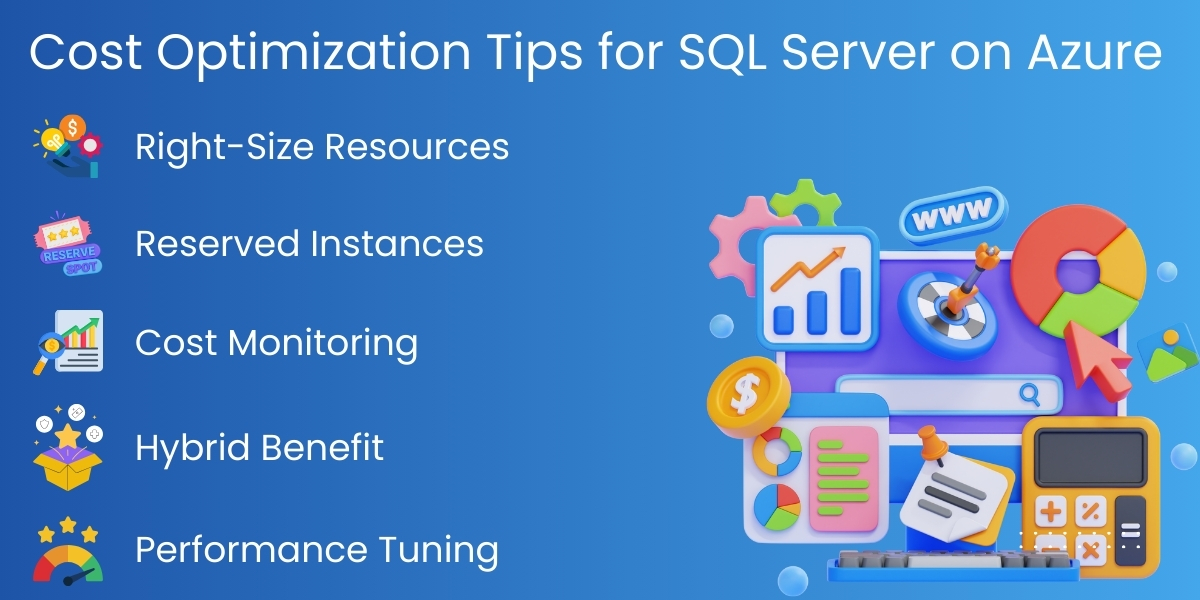
2. Right-Size Compute Resources
Over provisioning of compute resources is one of the highest contributors to increased Azure SQL costs.
To right-size compute resources, follow best practices:
- Review actual CPU, memory, and IO usage
- Don’t select VM sizes strictly based on peak usage
- Scale resources incrementally rather than allocating maximum resource capacity on day one
Azure enables you to scale resources up or down based on demand through workload assessment. Frequent reviews of performance help ensure you will only pay for what you need and use.
3. Use the Azure Hybrid Benefit (AHB) to help with SQL Server costs
The Azure Hybrid Benefits (AHB) option enables business to use older, on-premise SQL Server licenses on the cloud; hence, businesses can also save a significant amount of money by utilizing AHB when transitioning to the cloud.
The major advantages that AHB offers are:
- Businesses can use their current on-premises SQL Server licenses in the cloud.
- Save up to 55% on SQL Server licensing costs.
- Use AHB on both Azure Virtual Machines (VMs) and Azure SQL Service.
Organizations with Software Assurance (SA) can reduce their Total Cost of Ownership (TCO) considerably when reusing their licensing rather than paying full price for Azure.
4. Use Reserved Instances (RI) on Azure for Predictability
If your business regularly runs SQL Server workloads around-the-clock, you can benefit from the savings provided by Azure Reserved Instances (RI).
Key benefits of using (RI) for Azure SQL Server workloads include:
- Commit to either a one-year (1 yr) or three-year (3 yr) contract for your SQL Server workload.
- Save up to 72% when using Azure Reserved Instance in comparison to using Pay As You Go (PAYG).
- This option is best for production databases that maintain steady workloads.
Azure Reserved Instances work exceptionally well for enterprise applications where resource consumption remains relatively constant over an annual period.
5. Optimize Data Management and Storage
Storage costs can increase significantly if you don’t monitor them.
- Consider the following smart storage management techniques to help optimize your storage.
- Select the correct type of storage – Premium, Standard or Ultra Disk
- Delete unused databases and old backups
- Archive infrequently accessed files to lower cost storage
- Compress the size of the large tables and indexes.
- Monitor I/O throughput to ensure that you are not overpaying for high-end disks
Optimized storage saves money and increases performance levels of the storage type used.
6. Auto-Scaling and Elastic Pools
Azure offers an elasticity (the capacity to grow/shrink as needed) that traditional on-premises environments do not provide.
Auto-scaling allows:
- Resources to scale up in response to peak demand and down when demand is lower
- Avoidance of paying for unused resources
In the case of multi-tenancy/SaaS (Software as a Service) applications, Elastic Pools enable clustering of multiple databases across the same resources in order to reduce per-database costs.
7. Continuous Monitoring and Analysis of Costs
One cannot optimize without measuring.
Essential Tools for Monitoring Costs:
- Azure Cost Management and Billing
- Azure Monitor
- SQL Analytics
- Query Performance Insights
By monitoring trends in usage (compute, storage, and network), one can see any resources that are under-utilized and identify those that can be eliminated before they affect one’s budget negatively.
8. Performance Tuning SQL Server is a Key to Lowering Costs
Higher Resource Usage = Higher Bills.
To better perform query tuning and reduce resource costs, one can:
- Tune Slow-Running Queries
- Remove Unused Indexes
- Correct Blocking Issues
- Regularly Update Statistics
- Utilize Proper Indexing Strategies
By using fewer resources for efficient workloads, one has the ability to reduce the need for a greater amount of compute capacity while reducing costs overall.
9. Optimize Backup and Disaster Recovery Costs
Backup and disaster recovery strategies develop great value through proper optimization of resources.
Backup/Redundancy Develop Valuable Resource Allocation through Optimization and Feedback Loops.
Cost-Friendly Backup and Recovery Practices Include:
- Adjust your backup retention policies based on the need to archive past records.
- Retain Backups only for the time needed to keep your data integrity and business continuity results.
- Use Geo Redundancy where the costs required to maintain your environment are justified by business continuity requirements.
- Create a more defined regular schedule and process to review your DR requirements.
A balance should be struck with your risk and regulatory compliance requirements. 11. Proper Planning of Migration and Architecture.
10. Migrations done sloppily frequently lead to oversized environments.
Before migrating to SQL Server on Azure:
- Review how much capacity is being utilized on your current workload.
- Remove all Databases that are no longer in use, or not being actively used within this Environment.
- Modernize wherever you can, your ageing technology (Legacy Systems).
- Develop a Cloud Native Architecture.
A successful migration creates a more appropriate first setup with less expense associated with any future migrations or ‘Fixes’ of existing setups.
Real Case Study: 60% Cost Reduction
Problem:
A company was running SQL Server on oversized Azure VMs.
Analysis:
- CPU usage < 20%
- High storage cost
- No reserved pricing
Solution:
- Right-sized VM
- Switched to reserved instances
- Optimized storage
Result:
Monthly cost reduced from $2,500 → $1,000
60% total savings
Conclusion
Managing your costs for SQL Server using Azure will be an ongoing activity, not a one-time task. The ongoing costs could include using the SQL Server Hybrid Benefit to obtain the best of both worlds (Hybrid Model of Cost Effective Use of Resources & Cost Savings).
SQL Server on Azure can provide the Enterprise Grade Reliability of an E-Distributed Model without the associated costs of Implementing Distributed E-Systems.
At Empirical Edge, we help businesses optimize cloud infrastructure, reduce unnecessary spending, and improve performance.
Frequently Asked Questions
Absolutely. Proper optimization improves efficiency, eliminates waste, and maintains or even enhances performance through indexing, query tuning, and intelligent scaling.
Yes. Post-migration cost and performance audits identify over-provisioned resources, inefficient queries, and storage waste, enabling targeted optimization.
Yes. Ongoing cost optimization ensures predictable expenses, better budget control, higher performance per dollar, and long-term return on cloud investments.
Empirical Edge provides Azure SQL cost audits, performance tuning, migration optimization, license management, automated scaling, and continuous monitoring to help businesses minimize costs while maximizing performance.
Written by: Empirical Edge Team